The first version of an AI feature can be as small as one HTTP request to a model. As that feature becomes useful to real people, it often grows into a small distributed system.
You may need an application boundary that keeps credentials away from the browser, somewhere to store and search vectors, and a cache for repeated requests. Each process also brings configuration, health checks, logs, metrics, traces, and startup ordering. Before long, “run the AI demo” can mean opening several terminals and remembering which service needs to become healthy first.
I have found .NET Aspire helpful for that problem. It gives us a code-first application model for running, connecting, and observing the pieces. The AI SDK, vector-search strategy, and production architecture remain separate design choices. Keeping that boundary in view makes the rest of the system easier to reason about.
In this post, we will build this local stack:
flowchart LR
    Browser["Browser"] --> Web["Blazor web app"]
    Web --> API["ASP.NET Core API"]
    API --> Redis["Redis cache"]
    API --> Qdrant["Qdrant vectors"]
    API --> Ollama["Ollama model host"]
    AppHost["Aspire AppHost"] -. declares and connects .-> Web
    AppHost -.-> API
    AppHost -.-> Redis
    AppHost -.-> Qdrant
    AppHost -.-> Ollama
Before we look at the code, it helps to give each box a clear job:
| Component | What it does here | Why it belongs in the demonstration |
|---|---|---|
| Blazor web app | Provides the browser experience. It sends questions to the API and displays the answer and retrieved context. | Shows how the user-facing boundary can stay separate from infrastructure credentials. |
| ASP.NET Core API | Validates the request, chooses the answer generator, retrieves context, calls the model, and manages the cache. | Gives the application one server-side place to enforce those boundaries. |
| Aspire AppHost and dashboard | Describes the resources and their relationships, supplies connection information, waits for dependencies, and collects the local telemetry view. | Makes orchestration and diagnosis part of the application model instead of a collection of shell commands. |
| Qdrant | Stores vectors and their payloads, then returns the closest records for a query. A vector is a list of numbers used to represent data for similarity search. | Gives the sample a real retrieval service so we can follow a grounded request. The demo uses simple deterministic vectors, so it demonstrates the connection and query flow rather than semantic quality. |
| Redis | Stores a response under a cache key and returns it when the same question arrives again. | Makes state, expiry, cache keys, and the difference between a fresh request and a cache hit visible. |
| Ollama | Runs the local qwen2.5:3b model and exposes it to the API. | Lets the complete model and tool-calling path run on a developer machine without a cloud model credential. |
IChatClient | Provides the .NET abstraction the API uses to call the selected model. | Keeps provider-specific code at the edge so the application flow can be tested and changed more easily. |
The stack is useful as a teaching example because each component represents a concern that appears in many AI applications. Qdrant stands in for retrieval and grounding. Redis stands in for response state and repeat-request performance. Ollama stands in for model execution. Aspire connects those services, waits for them, and puts their logs, traces, and metrics in one place. The UI and API show where credentials and business decisions belong.
That combination gives us something small enough to run locally while still exposing the seams that matter in a larger system. We can watch a question travel from the browser to the API, through retrieval and model execution, into the cache, and back to the user. We can repeat the question and see the cache path. We can inspect the trace when a request is slow or a dependency is unavailable. Those are the same conversations a production team has when it chooses managed services, adds authentication, or investigates an unexpected answer.
The goal is not to suggest that every application needs this exact set of products. The goal is to make the responsibilities visible. Once those responsibilities are clear, Qdrant can be replaced by another retrieval service, Redis by another cache, and Ollama by a hosted model without losing the shape of the discussion.
The complete, runnable implementation is in the aspire-ai-stack companion repository. It targets .NET 10 and Aspire 13.5.3.
Aspire’s role in the stack#
Aspire’s AppHost describes the application as resources and relationships. In this sample it answers operational questions such as:
- Which projects and containers belong to the application?
- What connection information does each consumer receive?
- Which dependencies must be ready before a project starts?
- Which HTTP endpoints and health checks should the dashboard monitor?
- Where can I inspect logs, metrics, traces, resource state, and configuration?
The API still owns the AI behavior. It retrieves context, constructs the prompt, calls an IChatClient, caches results, and decides what is safe to return. Microsoft.Extensions.AI provides the provider-neutral IChatClient abstraction. Qdrant performs vector similarity search. Redis stores cached responses. Ollama hosts the optional local model.
That division keeps the system replaceable. The API receives Qdrant’s address from Aspire, and the API remains responsible for the semantics of a grounded answer.
Start from a safe default#
If you have tried to run an AI sample only to be stopped by a missing cloud key or a multi-gigabyte model download, you already know how quickly that friction gets in the way. This sample takes a more gradual approach:
- Redis, Qdrant, and Ollama are declared as real local resources.
- The API uses Redis and Qdrant by default.
- A normal AppHost run uses deterministic answer generation until the local model is explicitly enabled. Publish mode defaults to the local model for the generated Compose deployment.
- A container-free mode swaps Redis and Qdrant for in-memory implementations during tests.
The deterministic embedding function in the demo is small and reproducible. It lets us inspect storage, ranking, caching, API, and UI behavior without downloading another model. I would use it to verify the wiring. Production semantic retrieval needs an embedding model chosen and evaluated for the application.
You need .NET SDK 10.0.101 or a compatible 10.0 patch, the Aspire CLI, and a supported container runtime. The repository’s global.json pins the reviewed SDK feature band.
You do not need to run every moving part on your first pass. Choose the smallest path that helps you explore the behavior you care about:
| Goal | Command | What runs |
|---|---|---|
| Normal development | dotnet run --project AspireAiStack.AppHost | Real Redis and Qdrant with deterministic generation |
| Fastest credential-free check | dotnet run --project AspireAiStack.AppHost -- --Demo:UseContainers=false | In-memory retrieval and cache with deterministic generation |
| Real local generation | dotnet run --project AspireAiStack.AppHost -- --Demo:UseLocalModel=true | Redis, Qdrant, Ollama, and qwen2.5:3b |
| Full deployment-shaped verification | ./scripts/capture-compose-evidence.sh | One generated seven-service Compose project plus browser evidence |
For the normal development path, clone the companion and run:
| |
Open the dashboard URL printed in the terminal, then follow the webfrontend endpoint. If Aspire reports an untrusted development certificate, run:
| |
Know what the demo is prepared to answer#
A sample is easier to explore when it tells you what data exists before asking you to query it. The API exposes GET /api/knowledge/topics, and the homepage reads that endpoint to display the seven records seeded into the same catalog used for retrieval:
| Seeded topic | Suggested question |
|---|---|
| AppHost orchestration | What does the Aspire AppHost coordinate? |
| Service references | How do WithReference and WaitFor differ? |
| Built-in observability | How does Aspire expose logs, metrics, and traces? |
| Local AI development | How does Ollama keep model access server-side? |
| Production boundaries | What production decisions remain after using Aspire? |
| Vector search | How does Qdrant ground an AI answer? |
| Caching | How does Redis handle repeated responses? |
The UI does not maintain a second hard-coded list. It asks the API for titles and suggested questions derived from KnowledgeCatalog.Documents:
| |
Selecting a topic copies its suggested question into the form. Append a short unique suffix, such as your initials and the current time, then submit it and expect a fresh response with three retrieved context records. Submit the same question again and expect the identical answer with cache hit. If an exact question was asked earlier, Redis can return a cache hit immediately. The suffix gives this walkthrough a new cache key. The status card also tells you whether the run is using simulated or Ollama generation, Qdrant or in-memory vectors, and Redis or in-memory caching.
The first Qdrant-backed request may take a little longer while the API creates or refreshes those seven records. The delay comes from that setup work.
The catalog uses a deterministic 32-dimensional hash embedding so the demo remains reproducible without a second model download. Its rankings can feel unintuitive because the hash vectors are only there to exercise the retrieval path. They have not been evaluated for semantic quality.
Declare the application model#
For this sample, start with AppHost.cs. It is where the runtime shape becomes reviewable without asking you to hold every container, project, and startup dependency in your head.
The next three blocks show the core container/project branches. The model-loader, content-capture, and Compose configuration are discussed separately below. Use AspireAiStack.AppHost/AppHost.cs in the updated companion checkout for the complete file.
Choose the runtime shape#
Two settings let the same project graph support a quick check, normal local development, and the full local-model path:
| |
Publish mode defaults to the local model because the generated Compose application is meant to exercise the whole stack. An ordinary AppHost run stays deterministic until you explicitly opt in.
Declare the container-backed resources#
When containers are enabled, the API receives the Redis, Qdrant, and Ollama references. It also waits for those resources to become ready before starting:
| |
WithReference and WaitFor do different jobs. WithReference(cache) supplies the connection information the API expects under the resource name cache. WaitFor(cache) delays the API until Redis is ready. The first handles configuration. The second handles ordering.
Keep the project graph stable#
The container-free branch swaps only the API’s adapters. The API and web projects remain in the same relationship:
| |
The web project references only the API. Redis, Qdrant, and Ollama connection information stays in the API. That small graph gives us a clear security boundary to preserve as the sample grows.
Named resources are also contracts. The AppHost calls the resource qdrant, and the API asks for the connection named qdrant:
| |
If those names drift, the application compiles but fails at runtime. I tend to keep resource names intentionally boring and stable, then cover them with an AppHost test.
One AppHost, one Compose deployment#
The same application model can also become a single Docker Compose application. Add Aspire’s Docker hosting integration once:
| |
After declaring webfrontend, publish mode gives the browser-facing application a stable host URL for the dashboard:
| |
The AppHost remains the source of truth. aspire publish renders its resources and relationships to docker-compose.yaml. aspire deploy also builds the API and web images, generates the local environment values, and runs the Compose project. The generated file is a deployment view of the same graph, so there is no second architecture file to maintain by hand. See the official Aspire Docker integration and Docker Compose deployment documentation for the deployment commands.
The fixed host binding makes the Compose dashboard repeatable at http://localhost:18888. In a published Compose run, the homepage displays Open the Aspire dashboard next to the runtime status card. That link opens logs, traces, and metrics from the same application run. This standalone Compose dashboard does not provide the AppHost Resources view. Use docker compose ps with the generated deployment files to inspect container state. A normal dotnet run still uses the dashboard URL printed by the AppHost because that development endpoint is managed dynamically.
For this sample, the generated services are webfrontend, apiservice, Redis, Qdrant, Ollama, and the Aspire dashboard. Local model loading is represented by one additional short-lived service:
| |
The loader fills a gap in the generated Compose topology. It pulls the model into the shared Ollama volume and gives Compose a concrete service_completed_successfully gate before the API starts.
The generated Compose file uses service_started for the other dependencies and does not add Docker health checks. This establishes startup order. It does not carry over the AppHost’s health-waiting behavior. The evidence script checks the web health endpoint and submits a fresh request to confirm that the deployed application can serve traffic.
Run the complete local Compose path from the companion repository with:
| |
The script leaves the generated Compose project running so the web endpoint and dashboard can be inspected after the automated evidence capture. The web host port remains dynamically assigned, while the dashboard stays on port 18888. The script and deployment output report the web URL.
Keep model access behind the API#
The browser should not receive a model endpoint, API key, vector-store credential, or Redis connection string. The Blazor project calls only the API resource:
| |
Aspire service discovery resolves apiservice to the endpoint chosen for the current run. The API selects its implementations from configuration and the connection information injected by the AppHost:
| |
The same pattern selects Qdrant or deterministic in-memory retrieval. Keep those environment choices at the composition root. Both implementations satisfy the same small interfaces, so the application flow does not need to branch on infrastructure details.
The application service checks the cache, delegates to the selected generator, and caches its answer and sources. This excerpt omits telemetry and error handling:
| |
The generator owns retrieval. The simulated generator searches directly, while the Ollama generator exposes search as a tool for the model to call. Aspire handles how dependencies are found and observed. The C# interfaces let us test the application flow separately.
The cache is simple by design. Both implementations hash only the trimmed, lower-cased prompt, and Redis expires the entry after ten minutes. That is enough to demonstrate a repeat-request cache hit. A production key should also include the model and version, generation settings, grounding-corpus or index version, tenant and authorization scope, and any other input capable of changing the answer. Missing those dimensions can produce a stale response after a deployment or catalog update. In-memory entries last until the process exits. When changing model or generation mode against the same Redis instance, use a new question or wait for expiry so an earlier answer is not reused.
Opt in to Ollama through IChatClient#
To use a real local model, start the AppHost with:
| |
That flag changes the API mode and, for a normal AppHost run, adds a model resource:
| |
The API project’s earlier declaration sets AI__Mode from useLocalModel and sets AI__Model to qwen2.5:3b. Publish mode takes the other branch shown in the Compose section: the one-shot chat-model-loader pulls the model into the shared Ollama volume before apiservice starts.
The first run downloads the model, so it takes longer. The API adapts OllamaSharp to IChatClient and adds AI telemetry middleware:
| |
I chose qwen2.5:3b here because it supports structured tool calling. That lets the real path exercise the complete bounded agent loop: the model requests search_knowledge, FunctionInvokingChatClient executes it, and the model receives the result before producing the answer. In testing, a text-only model such as phi3:mini did not produce this evidence reliably, so the demo’s evidence run is pinned to the Qwen path and its structured tool_calls response.
captureSensitiveAiTelemetry is derived from AI:CaptureTelemetryContent or the standard OTEL_INSTRUMENTATION_GENAI_CAPTURE_MESSAGE_CONTENT switch, and the sample additionally requires the Development environment. That means the same middleware can power a richer local dashboard walkthrough without making prompt or response capture an accidental production default.
That resolver handles both a plain HTTP URI and Aspire’s structured Endpoint=http://... connection-string format. Treating the injected value as an ordinary URI looks reasonable, but fails when the real AppHost wires Ollama into the API. It is an easy boundary issue to miss, and a good example of what a full-stack test can reveal beyond an isolated API test.
IChatClient also gives middleware a stable place to add logging, telemetry, caching, or other cross-cutting behavior. The .NET AI ecosystem guidance positions Aspire as the application orchestration layer and Microsoft.Extensions.AI as the AI abstraction layer. Keeping those roles separate makes the code easier to reason about.
That also gives you a practical provider seam. To move to Azure OpenAI or another provider, extend the API’s provider-selection branch, register that provider’s IChatClient, and set AI:Mode to the value you want the status endpoint to report. Keep credentials in server-side configuration and leave the browser contract alone. In production, remember to add the provider, model version, generation settings, and grounding-corpus version to the cache identity.
For a deeper look at model hosting itself, read Running Local AI with .NET and Ollama. This article concentrates on everything around the model.
Observability is part of the development loop#
Each service calls the template’s AddServiceDefaults() extension. That configures service discovery, resilience, health endpoints, and OpenTelemetry plumbing. The Aspire dashboard then brings the resource state and telemetry into one place.
The trace provider subscribes to both the application source and the source emitted by the IChatClient middleware:
| |
The second source name connects the two sides of the telemetry setup. The middleware creates AI activities, and the OpenTelemetry provider listens to that source so it can export the model spans.
The sample also creates the workflow, agent, tool, and retrieval spans around each grounded request:
| |
On the recorded Ollama path, the chat activity wraps the tool-calling loop. The diagram shows the application and AI spans. HTTP and Redis spans are omitted:
| |
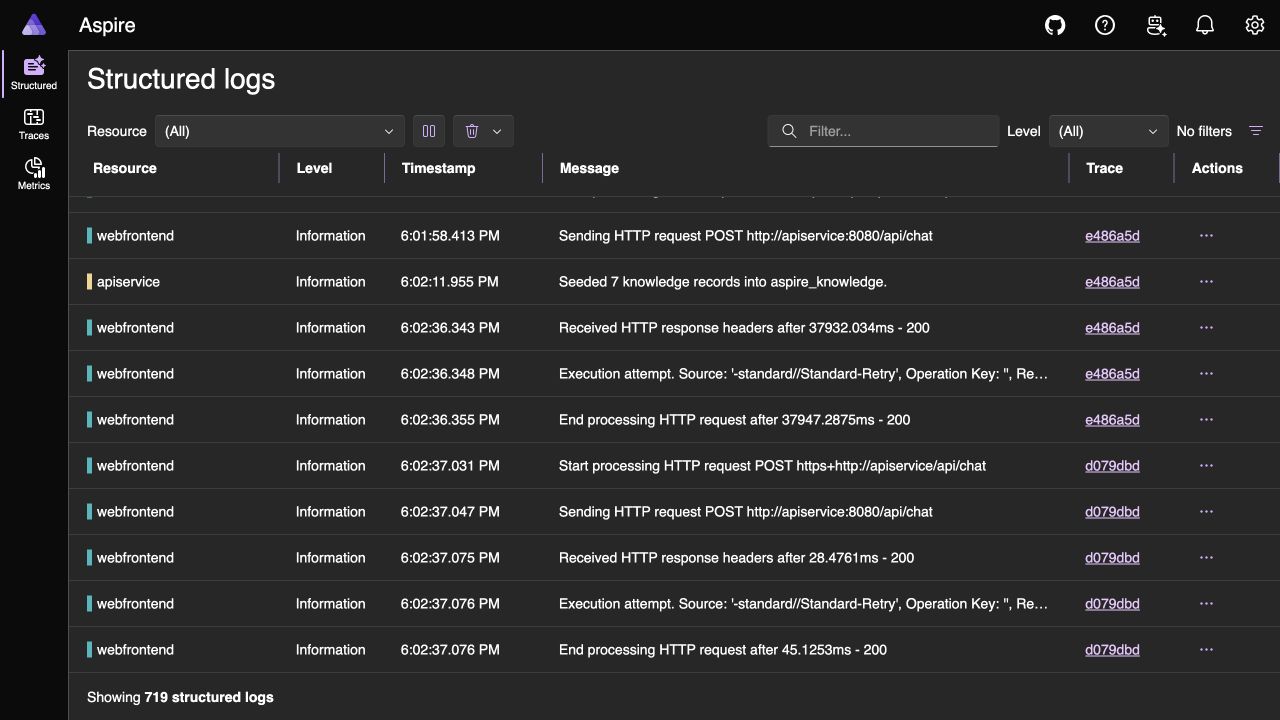
The dashboard’s structured-log view gives the same request a second, useful perspective: webfrontend sends the call to apiservice, the API seeds or queries the knowledge store, and both sides link back to the same trace. That relationship is often more valuable during diagnosis than a wall of unrelated log lines.
Microsoft.Extensions.AI supplies the model and function-invocation spans when the provider returns structured tool calls, including token usage and model timing. The sample’s tool boundary has an adapter-safe guard. If a provider does not publish its own execute_tool activity, the tool creates the standard span. If MEAI already created one, the sample skips the duplicate. This keeps the trace shape stable across local model adapters. The application supplies the agent identity and workflow boundary, while the retrieval tool adds a datastore-specific child span. Service defaults also subscribe the AspireAiStack.AI meter so the dashboard can receive GenAI client metrics such as token usage and operation duration. The demo uses non-streaming calls, so it does not exercise time-to-first-chunk or per-chunk metrics. Raw message content, tool arguments, and tool results remain opt-in through OTEL_INSTRUMENTATION_GENAI_CAPTURE_MESSAGE_CONTENT.
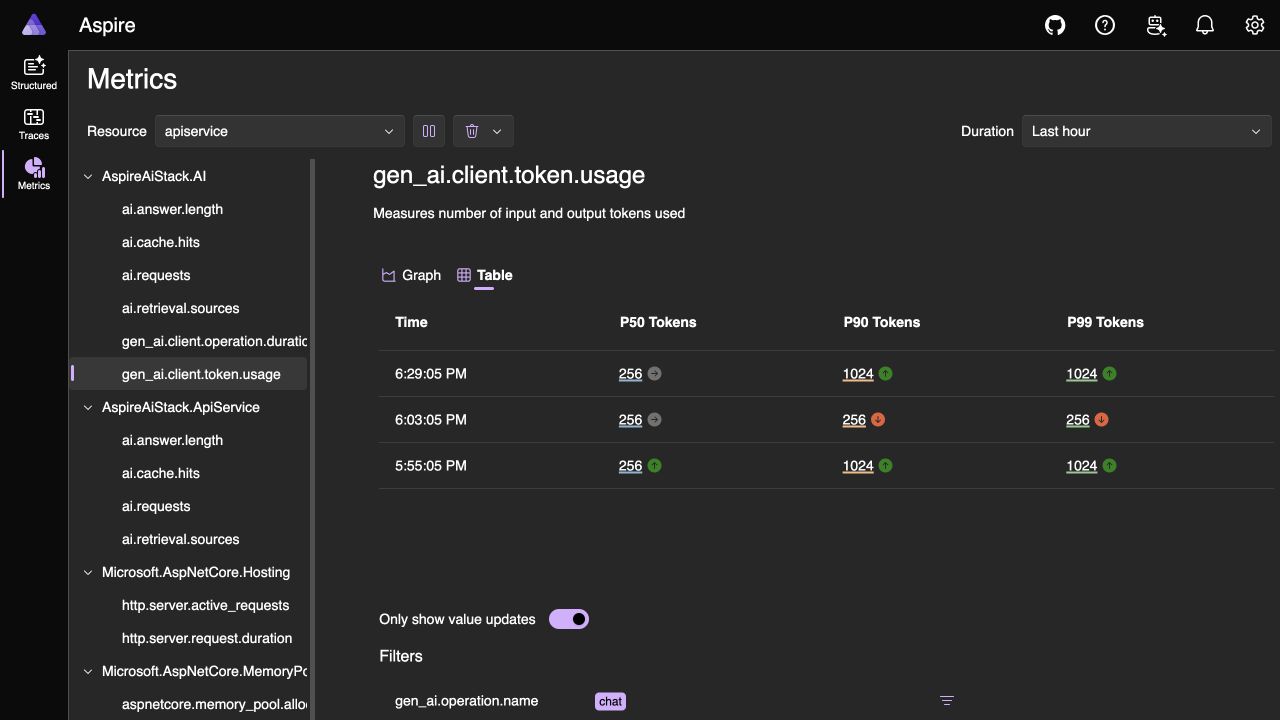
The Metrics view provides a compact operational check. Selecting the apiservice resource and gen_ai.client.token.usage instrument shows the model, provider, operation, server, and token-type dimensions alongside P50/P90/P99 values. In this run the table reports a 256-token median and 1,024-token upper percentile for the captured intervals. The view helps track changes in token usage over time. These values are aggregated histogram percentiles rather than exact totals for one request. Open the GenAI trace details for per-request totals, and filter input and output token types separately when comparing usage.
The application adds a small set of safe, sample-owned signals around those library-provided spans. Workflow and agent spans carry the prompt version (grounded-answer-v2), seeded-corpus version (seeded-knowledge-v1), request trace ID, cache outcome, and source count. The agent span also carries its description. The application-owned AspireAiStack.ApiService meter records request outcomes, cache hits, retrieval source counts, and answer length. The AspireAiStack.AI meter carries the library-provided GenAI measurements. These signals expose prompt and corpus changes without recording the prompt or retrieved documents.
For a local walkthrough, content capture can be enabled explicitly:
| |
The API only honors that switch in the Development environment, and the homepage reports whether capture is active. The richer GenAI view is available for a local walkthrough while content collection stays off by default.
These tags answer useful questions without logging prompts or retrieved text. Telemetry can easily become an accidental copy of sensitive user input, so content capture stays off by default.
The dashboard is useful for local diagnosis. A production system also needs an export destination, sampling and redaction rules, and a retention period. Distributed Tracing in .NET with OpenTelemetry covers that layer in more depth.
Test the stack at multiple levels#
Distributed applications benefit from checks at more than one level. The companion combines fast feedback, browser behavior, and the real containerized path:
| Layer | What it helps verify |
|---|---|
| Unit | The seven-topic catalog is stable, embeddings are deterministic and normalized, results are ranked, cache keys normalize prompts, and Ollama connection strings resolve correctly. |
| API integration | Validation, status, seeded-topic discovery, grounding, and repeated-request cache behavior work through HTTP. |
| bUnit component | The UI presents runtime boundaries and safe-default state. |
| AppHost orchestration | Aspire starts the API and web resources, waits for health, and routes requests by resource name. |
| Browser smoke | Chromium verifies the homepage guidance and seeded topics, submits a question through the credential-free UI, and captures a screenshot and Playwright trace. |
| Live model end to end | An opt-in run starts Ollama, Qdrant, and Redis, then verifies fresh and cached responses through both HTTP and the browser. |
| Compose evidence | The generated single-file Compose deployment starts the full stack, exposes the web health endpoint, verifies the homepage dashboard link, and checks the browser fresh-to-cached path. |
The orchestration test uses Aspire’s DistributedApplicationTestingBuilder:
| |
Passing configuration to the AppHost keeps the same API-to-web project graph while omitting the container resources and selecting deterministic in-process implementations. Microsoft documents this argument pattern in Manage the AppHost in tests.
I still like to give the container integrations an environment-level smoke test before release. Unit tests can verify our Qdrant adapter logic. Running Qdrant, Redis, and Ollama through the AppHost also checks image compatibility, connection wiring, model generation, and readiness behavior.
Run the complete local gate with:
| |
In the updated checkout, the ordinary test run reports 21 passing tests and two intentional skips. The live-model test needs Docker and may download several gigabytes on its first run. The Compose evidence test expects an already deployed stack and a COMPOSE_BASE_URL. To capture the AppHost-managed live-model bundle, run:
| |
To build, deploy, and verify the generated Compose application instead, run:
| |
What we learned from the real end-to-end run#
Before relying on this walkthrough, I wanted to verify that the local model could run under the AppHost, the API could retrieve real Qdrant records and generate an answer, Redis could return that exact answer on the second request, and the browser could show the same boundaries without receiving infrastructure credentials.
I ran capture-live-model-evidence.sh against .NET 10.0.1 with Ollama 0.32.15, qwen2.5:3b, Qdrant 1.18.0, and Redis 8.6.7. The current evidence run reused persistent infrastructure and model data, then waited for readiness before sending traffic. Since the model was already present, allow extra time and disk space on your first run.
The direct API path returned HTTP 200 with three Qdrant sources and cacheHit: false. The fresh request also emitted the workflow, agent, tool, retrieval, and chat trace hierarchy, along with the prompt/corpus versions and source count. Repeating the same prompt returned the identical model answer with cacheHit: true. The cached path contains no model or retrieval child span and increments the cache-hit metric. Chromium then exercised a separate prompt through the UI, verified the same fresh-to-cached transition, and captured screenshots plus a Playwright trace.
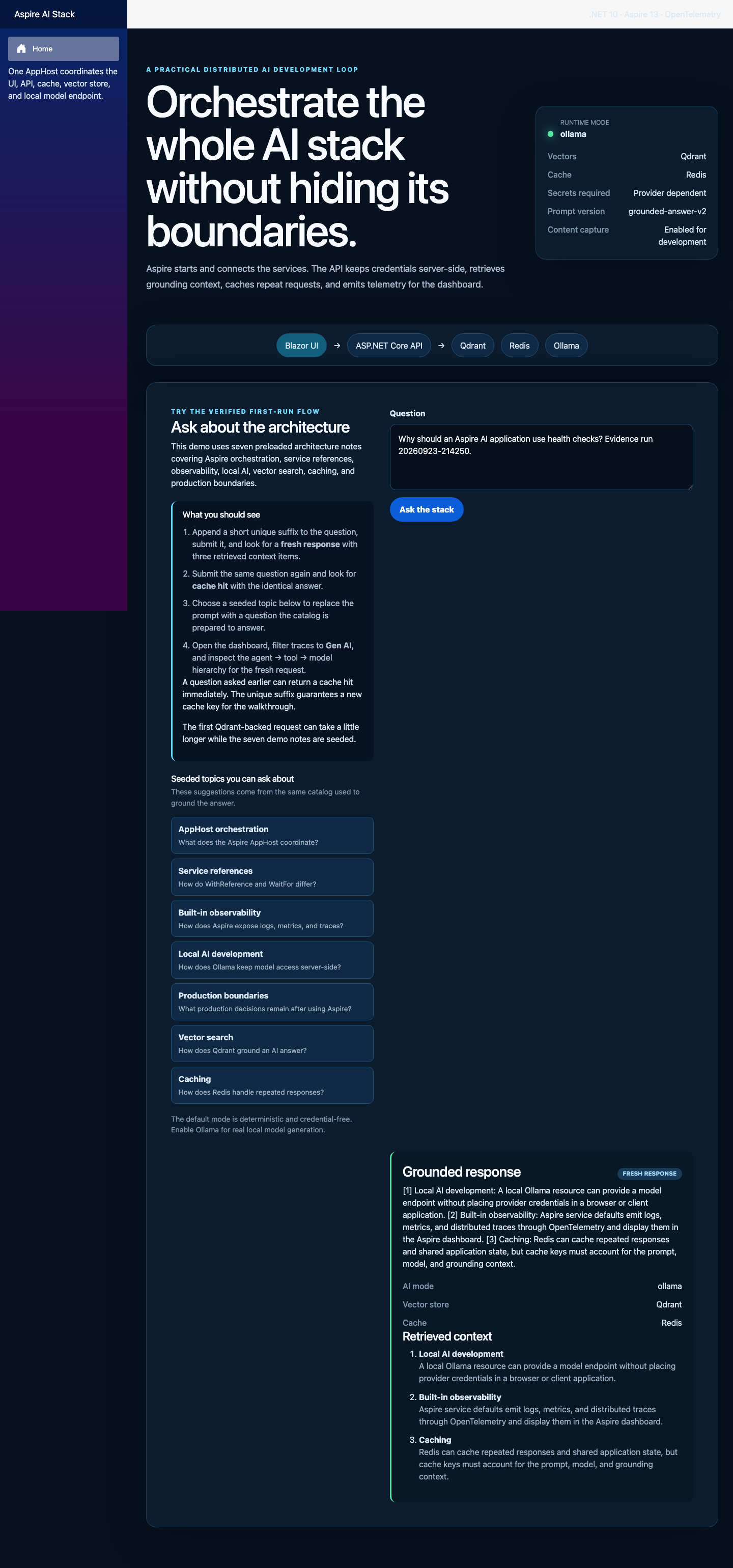
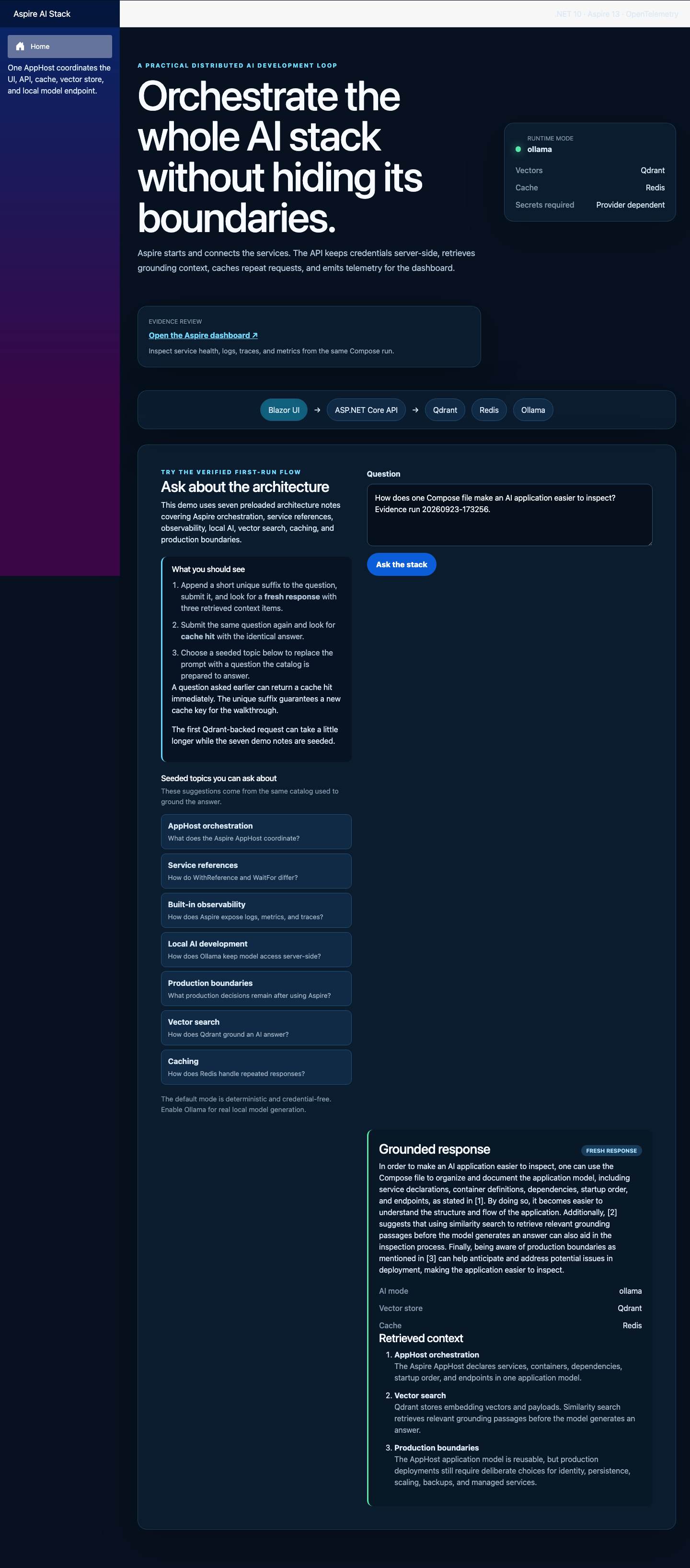
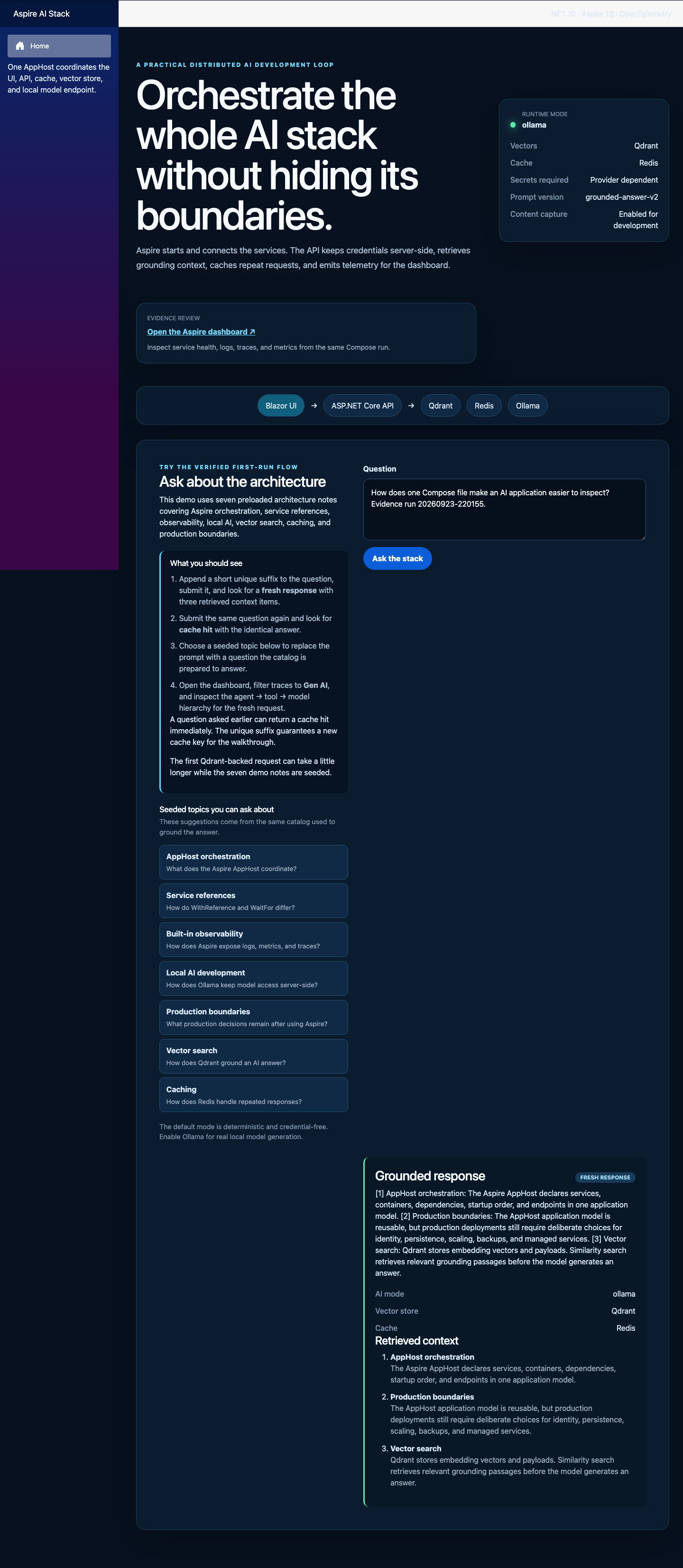
The fresh browser result is the first visual checkpoint. The UI reports the Ollama, Qdrant, and Redis path, displays the seeded topics, and shows three retrieved records alongside the generated answer.
The checked-in evidence bundle includes the machine-readable assertions, raw HTTP transcript, fresh and cached screenshots, runtime identities, and browser trace. Together, those artifacts show the declared local topology completing a request across the intended model, retrieval, cache, health, and UI boundaries.
The evidence has a clear limit. It does not establish answer quality or production readiness. The small local model can phrase an answer awkwardly, and the deterministic embeddings can rank a surprising source. This sample tests the services around the answer. Evaluating whether the answer is useful requires a separate set of questions, expected results, and graders.
Follow one request through the Compose evidence#
The Compose run makes the article’s boundaries concrete. The browser talks only to webfrontend. Service discovery inside that container sends the request to apiservice. The API owns retrieval, model access, and caching.
The homepage identifies the live Ollama, Qdrant, and Redis boundaries and exposes the dashboard link for the same Compose run. The first prompt is a cache miss. The API searches Qdrant for three grounding records, sends the prompt plus those records to Ollama, and stores the response in Redis. The second identical prompt returns the same answer with cacheHit: true, so the API skips retrieval and generation.
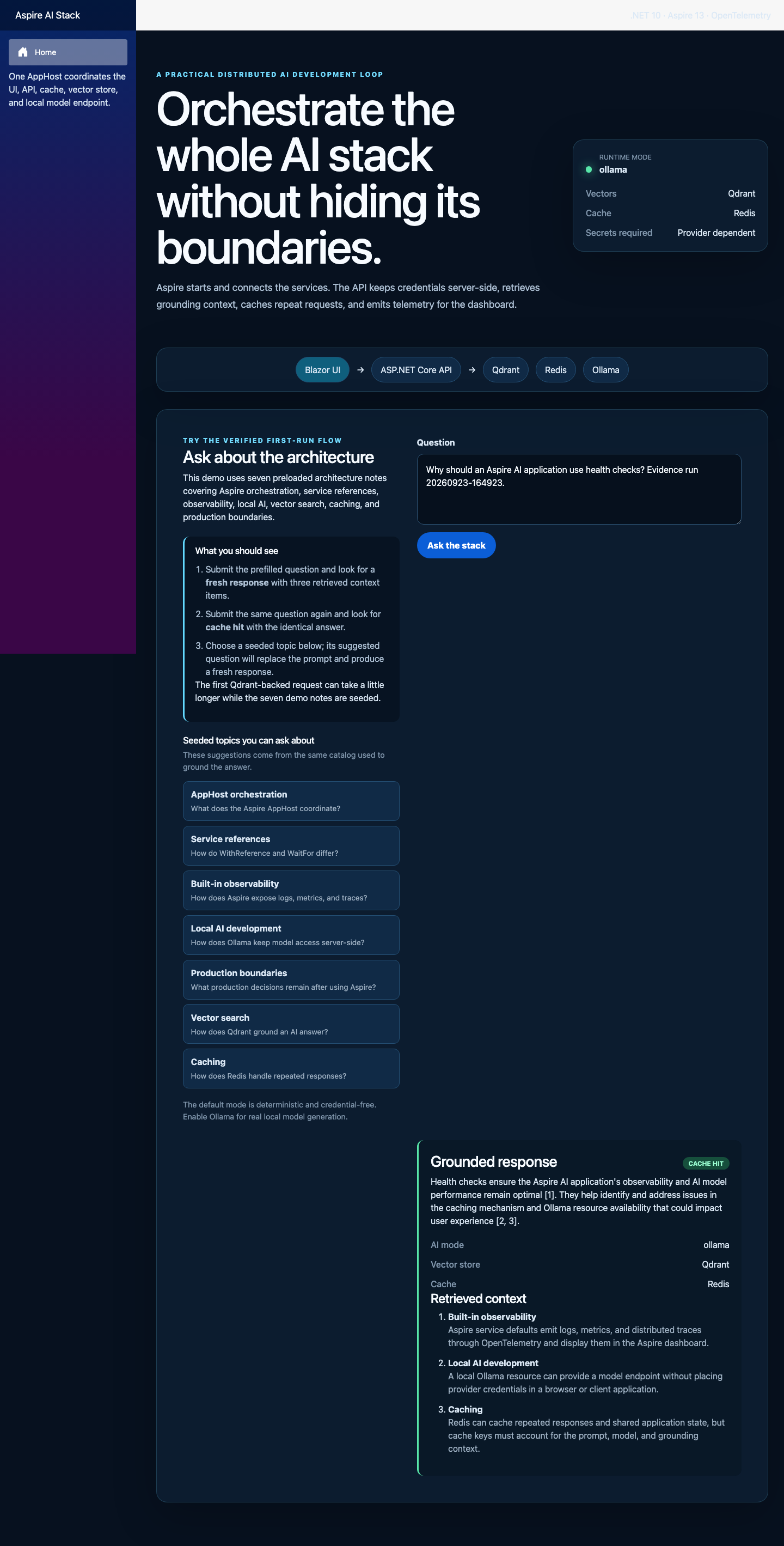
The second browser capture makes the cache boundary visible. The same question is still on screen, the result is labelled CACHE HIT, and Redis returns the stored answer.
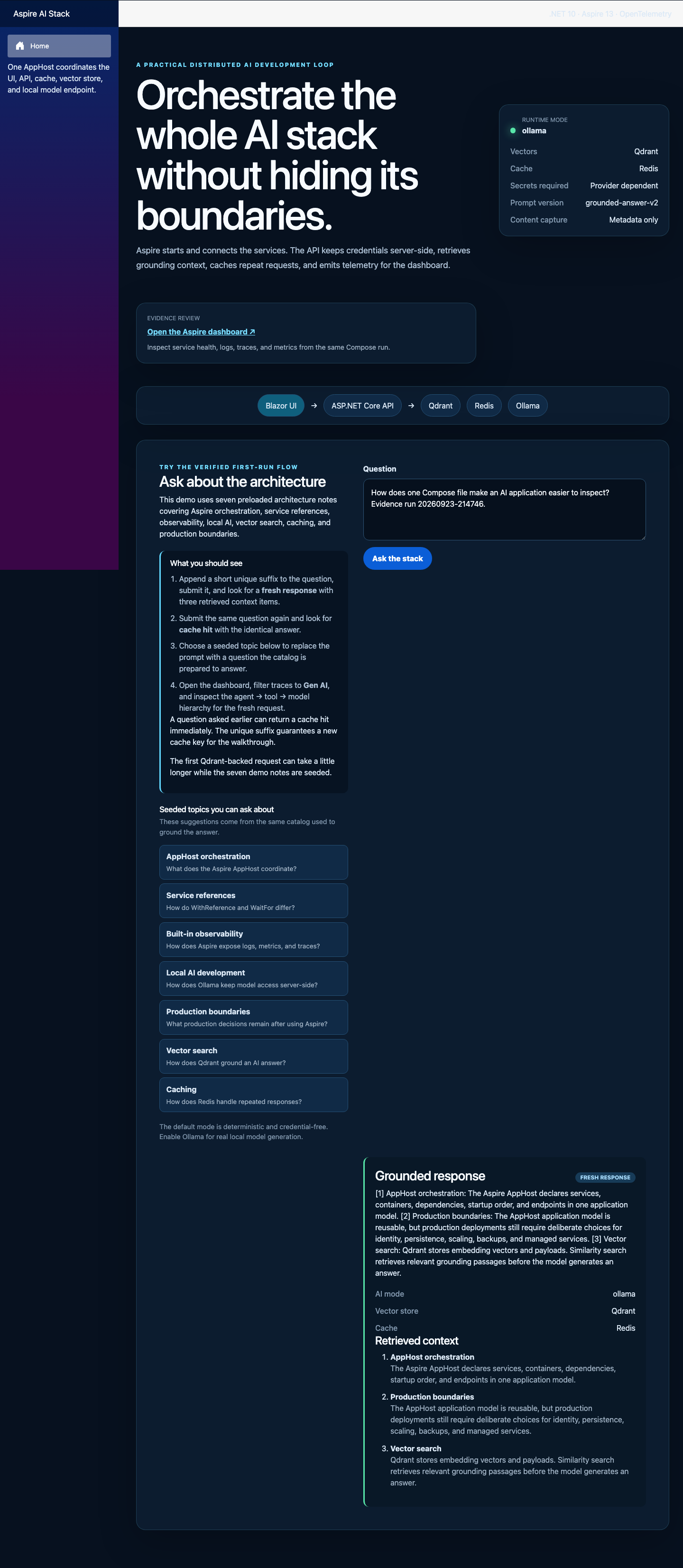
The evidence is split by claim:
| Artifact | What to inspect |
|---|---|
compose-run.json | HTTP 200 health, verified http://localhost:18888 homepage link, three sources, cacheHit: false then true, and identical answers |
compose-containers.json | The seven-service Compose project, image identities, and the model loader’s exit code 0 |
compose-ui-fresh.png | Homepage guidance, seeded topics, dashboard link, Ollama/Qdrant/Redis status, retrieved context, and FRESH RESPONSE |
compose-ui-cache-hit.png | The repeated prompt and visible CACHE HIT state |
compose-trace.zip | Browser DOM snapshots and request activity across both interactions |
The AppHost declares the topology, Compose runs it as one application, and the evidence records behavior at the same boundaries described in the code. The current evidence is in the companion checkout under docs/evidence/compose. The previously published revision b98c1ba predates the Qwen tool-calling and telemetry updates shown here.
Inspect GenAI message content when needed#
The default run records workflow, agent, model, retrieval, cache, token, and timing metadata. It leaves the conversation out of telemetry. For this article, I also ran a separate Compose capture with a synthetic question and --Demo:CaptureTelemetryContent=true.
Selecting the chat qwen2.5:3b span and opening GenAI details shows the agent instruction and question, the search_knowledge tool call, the three-record tool response, and the final assistant output. The same panel reports 666 input tokens, 128 output tokens, 794 total tokens, and one registered tool. The dashboard presents that conversation as a timeline alongside the ordinary request spans.
The metadata-only view makes the privacy boundary clear. The same chat qwen2.5:3b panel reports 667 input tokens, 128 output tokens, 795 total tokens, and one tool. It also says that no message content was recorded. You can follow the execution and measure the call while keeping the conversation out of the trace.
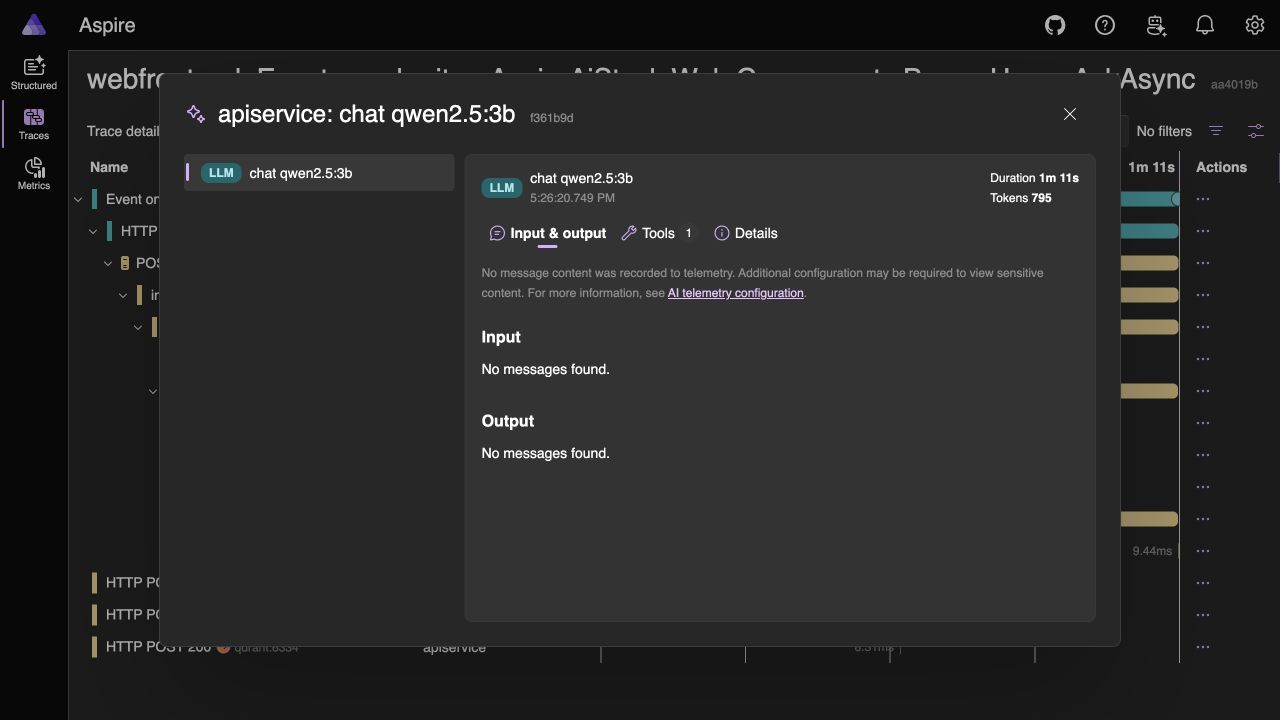
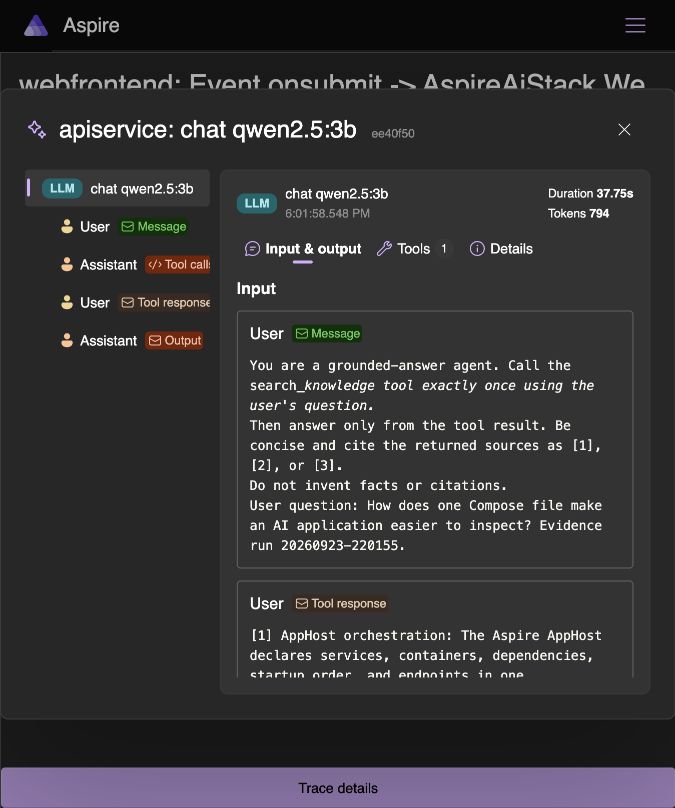
The content-enabled run and dashboard screenshots are documented in the companion checkout at docs/evidence/compose-content/README.md. These additions are newer than the pinned revision linked above. Publish the updated companion revision alongside this article. I keep the raw dashboard trace local and use synthetic prompts because captured prompts, retrieved passages, tool arguments, and model responses can contain sensitive information.
Troubleshoot the expected first-run edges#
Most failures in this sample are easier to diagnose once you know which delay is expected and which resource owns it:
- The first local-model start is slow: Ollama must download
qwen2.5:3b. The evidence test allows up to 20 minutes for a cold machine, even though the reviewed run was much faster. - Port
18888is already in use: another Compose project or process owns the fixed dashboard port. Stop it before starting the Compose evidence path. - The first Qdrant request takes longer: the API creates or refreshes the seven seeded records on the first search.
- The homepage says the API is not ready: use Retry loading the demo, then inspect
apiservicehealth and logs in the dashboard if it still fails. - An evidence script stops immediately: install the named prerequisite. The scripts check their command-line dependencies before changing the deployment.
The Compose script leaves the project running for inspection and prints an exact docker compose ... down command. Use that command when you are finished so the generated environment file and project name match the deployment you actually started.
Production decisions that remain#
The local AppHost makes dependencies explicit. Production still requires decisions about the services, security boundaries, data, and operating model.
Before deployment, I would work through questions like these with the team:
- Should Redis and the vector database be managed services or stateful containers?
- How are identities assigned, rotated, and authorized?
- Which endpoints are public, private, or reachable only inside a virtual network?
- How are indexes and caches backed up, rebuilt, and migrated?
- How does each service scale, and what happens when the model is saturated?
- Which prompts, outputs, and retrieved documents may enter logs or traces?
- What content-safety and evaluation gates apply to model output?
- What is the tested fallback when the model, vector store, or cache is unavailable?
The companion stops at the local Compose boundary, so it does not carry an unused cloud-hosting package. If Azure Container Apps is your target, add the Aspire.Hosting.Azure.AppContainers integration and use the aspire deploy pipeline:
| |
| |
Review the generated plan and its service substitutions before accepting it. Deployment automation can provision resources. The team operating the system still owns decisions about data classification, recovery objectives, network boundaries, and cost.
If you are containerizing the application outside an Aspire deployment pipeline, Deploying .NET AI Applications with Docker covers image construction and runtime concerns. For the retrieval layer, Building RAG Pipelines with Kernel Memory provides additional grounding context. Once the system is running, Evaluating AI Applications and Agents in .NET adds answer-quality measurement alongside service health.
What to carry into your own project#
For me, Aspire’s value comes from making the system around an AI call easier to see, discuss, and repeat.
The AppHost gives the team one place to review resource names, dependencies, health checks, endpoint exposure, startup ordering, and deployment intent. Service discovery removes hard-coded development ports. The dashboard shortens the path from a failed request to the relevant resource, log, or trace. The testing host lets the same application model participate in automated checks.
I use a simple division of responsibility: Aspire orchestrates, Microsoft.Extensions.AI abstracts model access, the application owns retrieval and safety, and the production platform provides the durable operational guarantees. Clear ownership makes local development easier while keeping the distributed system visible.