When an AI application calls a tool, the useful part of the work happens behind a protocol boundary. A method can be correct while the client still receives the wrong schema, a malformed response, or a transport error that is difficult to diagnose.
Model Context Protocol (MCP) gives that boundary a standard shape for discovering and invoking tools. In this post we build a small C# server on ASP.NET Core, expose it through the official MCP C# SDK, and pair it with a Blazor WebAssembly page that makes the sample tools easy to inspect.
The companion repository is deliberately a teaching project. Its customer and weather tools return simulated fixtures, while its system-metrics tool deliberately reports data from the local process; none of the tools query an external system. Its browser page is a diagnostic UI. The page’s /api/mcp/* endpoints are application-specific APIs; they are not an MCP client and should not be mistaken for the protocol transport.
[!IMPORTANT] This post targets the current
2026-07-28MCP revision andModelContextProtocol.AspNetCore2.2.0. The HTTP transport is stateless Streamable HTTP atPOST /mcp. The oldGET /sseplusPOST /messagestransport is not mapped by this application.
The complete MIT-licensed example is on GitHub: cmalpass/csharp-mcp-server-blazor.
What changed in the current MCP revision?#
The protocol has changed since many early MCP tutorials were published. The 2026-07-28 transport is POST-only and does not use the initialize handshake, Mcp-Session-Id, a long-lived GET stream, or Last-Event-ID resumability. Each request carries its protocol metadata in _meta, and the MCP-Protocol-Version header identifies the revision used on the wire. The official transport specification and changelog are the source of truth when these details evolve.
This matters when reading older examples. A 2025 client may still send initialize, and a server can choose a compatibility mode for such clients, but a new server should use the SDK’s current stateless mode unless it has a specific reason to support legacy session behavior. The C# SDK documents this distinction in its stateless transport guidance.
Architecture#
The host contains two deliberately separate surfaces:
flowchart TD
    Client["Current MCP client"] -->|"POST /mcp\nStreamable HTTP"| SDK["Official C# SDK\nstateless transport"]
    SDK --> Tools["Attributed C# tools"]

    Browser["Blazor WebAssembly inspector"] -->|"GET/POST /api/mcp/*\napplication-specific API"| Registry["Diagnostic tool registry"]
    Registry --> Tools
The MCP endpoint is implemented by the SDK. The registry is retained only to provide the browser with readable schemas, local sample invocations, and a bounded diagnostic log. Keeping those responsibilities separate avoids presenting a convenience API as if it were an MCP wire trace.
Add the official SDK#
The server targets .NET 10 and references the ASP.NET Core transport package:
| |
Version 2.2.0 is a released package that targets .NET 8, 9, and 10. Pin the version in a real application and review the release history during upgrades.
The minimal host configuration is intentionally small:
| |
WithToolsFromAssembly discovers methods marked with the SDK’s tool attributes. Stateless = true is explicit here even though stateless is the current default: it documents the deployment decision and prevents an upgrade from silently changing the server’s session model. Stateless HTTP is easier to load-balance because requests do not depend on in-memory session affinity; it also means the server cannot initiate session-bound client requests such as elicitation.
The companion host adds the Blazor components, rate limiting, a 60-second request timeout, and a local diagnostic API around this SDK configuration. Those are host concerns, not replacements for the SDK transport.
Define tools with attributes#
Tools are ordinary C# methods. The SDK uses descriptions and signatures to generate the tool schema exposed to MCP clients:
| |
ReadOnly and Idempotent are behavioral hints that clients must treat as untrusted; they are not enforcement or a security boundary. They are not a substitute for authorization: a read-only tool can still disclose sensitive data. Descriptions are part of the model-facing contract, so write them as carefully as API documentation and validate every argument inside the tool.
The repository includes four demonstration tools: system metrics, customer filtering, compound investment growth, and weather data. The system-metrics tool reports live values from the local process; customer and weather data are fixtures. The financial example uses decimal, validates positive inputs, bounds the total number of compounding periods, rounds explicitly, and says that it is not financial advice. The weather result uses a stable FNV-1a fixture hash and a fixed sample timestamp; it does not call a weather service. Those fixture choices make tests repeatable without implying that the data is real-time.
A diagnostic Blazor surface#
The Blazor page shows the generated schemas and invokes the same sample implementations through /api/mcp/tools and /api/mcp/call. It also displays a small, bounded diagnostic log. Development captures invocation arguments for local troubleshooting; outside Development, those payload previews are redacted. Do not enter secrets or sensitive values into this teaching UI.
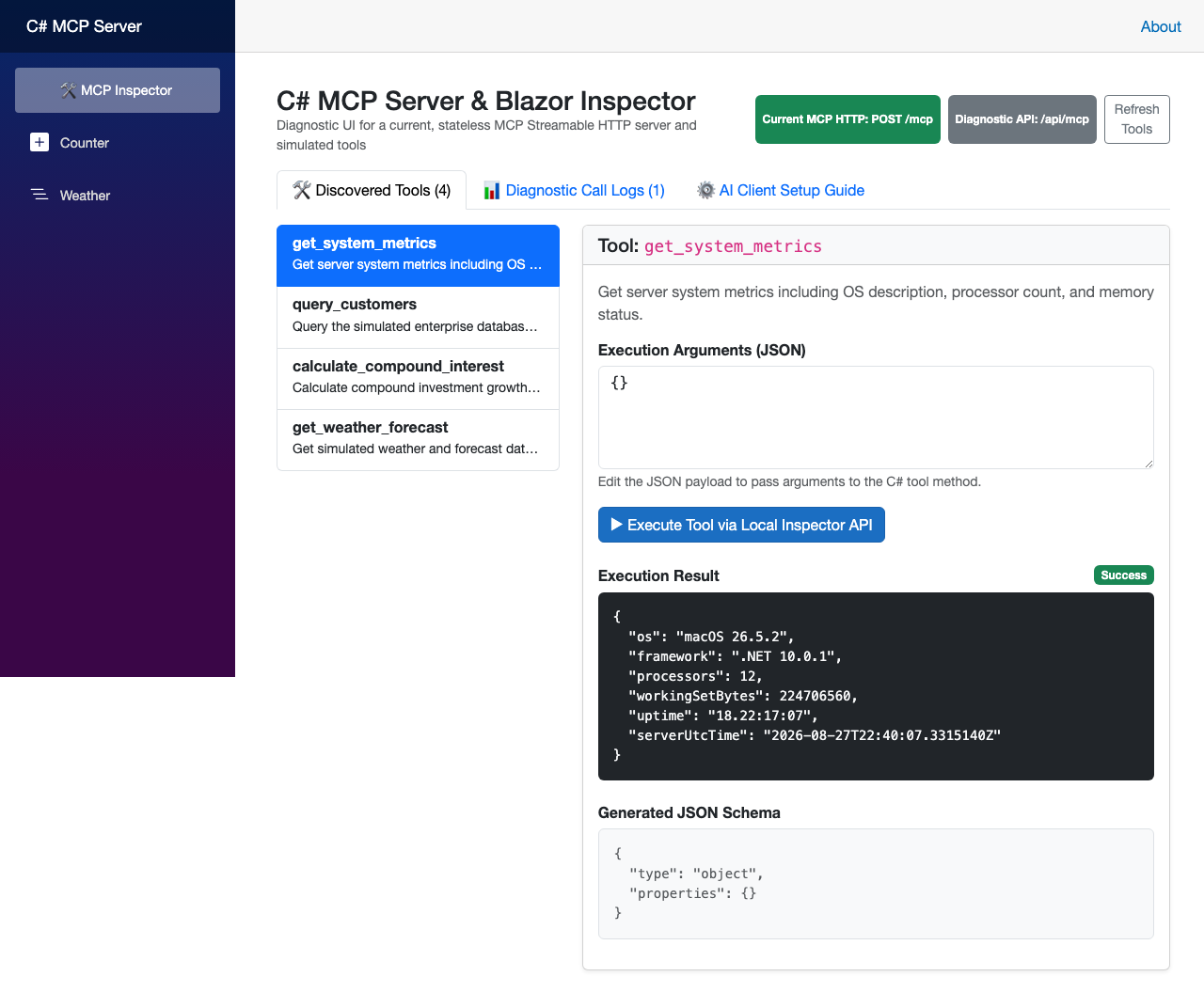
There is an important distinction here:
| Surface | Purpose | Protocol status |
|---|---|---|
POST /mcp | External MCP clients | Current SDK Streamable HTTP |
/api/mcp/tools and /api/mcp/call | This page’s convenience API | Application-specific JSON |
The Execute button therefore says “Local Inspector API”. It does not claim to have sent an MCP request, and the page does not embed static Claude, Cursor, or Inspector configuration that could become stale as those products change.
Secure the HTTP boundary#
The SDK validates MCP messages and transport headers, but an ASP.NET Core host still owns its perimeter. The sample applies a per-client token-bucket limiter and a request timeout to /mcp and the diagnostic API. It also keeps the diagnostic UI local and validates the Host and Origin values accepted by the MCP route. If a reverse proxy terminates TLS, configure trusted forwarded headers before this validation and restrict trust to the proxy’s known address; this demo opts in with Mcp:TrustedProxyAddress and otherwise ignores forwarded headers. In a deployed service, use an explicit allow-list appropriate to the public origin and reject cross-site requests; the MCP specification calls out DNS-rebinding protection as a server responsibility.
Do not copy the demo’s unauthenticated local setup into a public service. Before exposing tools, add authentication and per-tool authorization, run behind HTTPS, configure a trusted reverse proxy, and avoid logging raw arguments or results. For a remote MCP server, follow the current authorization specification, including protected-resource metadata and OAuth requirements where applicable. A bearer-token check on an arbitrary endpoint is not a complete MCP authorization implementation.
Test the contract#
The repository tests the tool calculations, generated diagnostic schemas, Blazor component behavior, and the actual HTTP endpoint through WebApplicationFactory. The integration tests exercise current transport behavior: a POST request with the required headers, tool discovery, successful and invalid tool calls, malformed requests, missing or mismatched metadata headers, origin and host validation, and rejection of the removed SSE routes. The Playwright test drives the diagnostic page and writes its screenshot and traces to ignored test-output directories, so running it does not modify a tracked documentation asset.
| |
For an independent protocol check, run the official MCP Inspector against the local POST /mcp URL and select its current Streamable HTTP transport. Keep the Inspector version aligned with the protocol revision you are testing; its UI and command-line options evolve independently of this sample.
Production checklist#
Before treating this as a service rather than a learning project, verify:
- the SDK and protocol revision are pinned and reviewed during upgrades;
- the allowed hosts and origins are explicit;
- authentication, authorization, and tool-level audit events are designed for the data being exposed;
- request size, rate, concurrency, timeout, and reverse-proxy limits are set;
- logs redact prompts, arguments, results, and credentials;
- tools have cancellation, bounded external calls, and tests for failure paths;
- deployment uses HTTPS and a trusted proxy, with health and operational telemetry separate from tool results.
MCP makes the interface interoperable; it does not make an unsafe tool safe. The official C# SDK getting-started guide and the MCP specification should remain the references to consult after this post’s example has served its purpose.