If there’s one truth in modern software development, it’s that bolting AI onto an existing architecture without a strategic layer of abstraction is a fast track to technical debt.
When OpenAI first popularized the streaming chat completion endpoint, the ecosystem scrambled to build HTTP wrappers. Then came Anthropic. Then Gemini. Then local LLMs via Ollama. Suddenly, developers found themselves rewriting their integration layers every three months just to try out a new model. We needed a unified abstraction.
Enter Microsoft.Extensions.AI.
In this guide, we are going to build a production-oriented Blazor WebAssembly AI Chat Application. Rather than wiring the browser directly to a model provider, the client talks to an ASP.NET Core “Agent Gateway”. The gateway owns provider credentials, validates and bounds requests, and uses IChatClient to stream a response back to the browser at a controlled render cadence.
[!TIP]
The complete, MIT-licensed source code for the demonstration built in this article is available on GitHub: cmalpass/blazor-wasm-agent-chat.
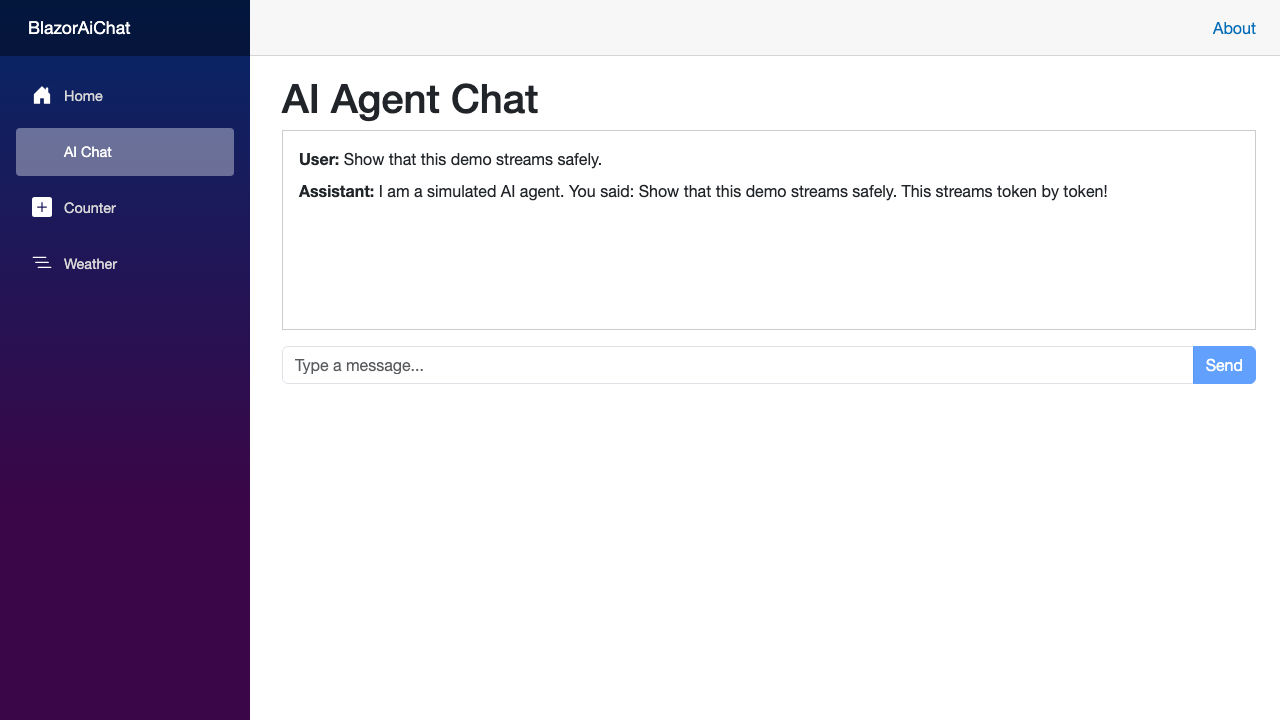
The companion repository is intentionally useful immediately after cloning: dotnet run --project BlazorAiChat starts the Development profile, which uses the in-memory SimulatedChatClient and never asks for model credentials. That is the exact flow exercised by its Playwright smoke test.
The browser test verifies the page renders, the streaming-only Stop control appears, and the complete response reaches the UI. Its successful screenshot is retained as a GitHub Actions artifact, and failed runs add a trace, so the README image is backed by a repeatable interaction rather than a hand-waved mock-up.
Blazor WebAssembly (WASM) lets us run .NET code in the browser. One useful consequence for an AI application is a shared transport contract between the client and gateway.
In this sample, ChatRequest and ChatMessageDto live in the client project, which the server already references. That gives both sides one small, strongly typed JSON contract while keeping provider-specific Microsoft.Extensions.AI objects on the trusted server. The response is deliberately a raw text/plain stream, so the client reads it with a StreamReader rather than ReadFromJsonAsAsyncEnumerable().
However, running AI logic directly in the client browser presents a severe security risk. You must never embed your LLM API keys (OpenAI, Anthropic, Azure) in a WebAssembly payload. The client environment is fundamentally untrusted; anyone can inspect the browser dev tools, extract your DLLs, and recover hardcoded tokens.
To solve this, we employ the Agent Gateway Pattern:
Diagram
flowchart LR
    subgraph Browser ["Client (Browser Runtime)"]
        WASM["Blazor WASM\n(Chat.razor)"]
    end

    subgraph Backend ["ASP.NET Core Backend (Trusted Server)"]
        Gateway["Agent Gateway API\n(/api/chat)"]
        MEAI["Microsoft.Extensions.AI\n(IChatClient)"]
    end

    subgraph Providers ["AI Model Providers"]
        Ollama["Local Ollama\n(phi3 / llama3.1)"]
        Azure["Azure OpenAI\n(gpt-4o)"]
        OpenRouter["OpenRouter / Anthropic"]
    end

    WASM -->|"HTTP POST (Stream chunks)"| Gateway
    Gateway --> MEAI
    MEAI --> Ollama
    MEAI --> Azure
    MEAI --> OpenRouter
Frontend (Blazor WASM): Handles the UI, raw-text stream consumption, bounded conversation state, and render coalescing.
Backend (ASP.NET Core Minimal API): Holds provider credentials, validates and bounds the conversation, rate-limits and times out requests, emits safe operational telemetry, and injects the IChatClient implementation. Production requests require authentication.
Before we write the code, let’s talk about IChatClient. Located in the Microsoft.Extensions.AI.Abstractions NuGet package, it is the standard abstraction for chat-based LLM interactions in .NET.
Instead of coding against a concrete vendor SDK (like Azure.AI.OpenAI or Anthropic.SDK), you code against IChatClient:
This means your application logic never knows whether it’s talking to a massive GPT-4o cluster in Azure, or a small Phi-3 model running locally via Ollama. It simply receives an IAsyncEnumerable of updates and processes them.
These are the package versions used when validating the snippets below. If you choose a different .NET 10 patch release, keep the ASP.NET Core package versions aligned with that SDK and re-run the build and test commands.
The small shared contract carries only user/assistant content. This protects the browser from a provider SDK and lets the gateway validate a simple, stable shape:
 1
 2
 3
 4
 5
 6
 7
 8
 9
10
11
12
13
14
15
16
17
18
// BlazorAiChat.Client/Models/ChatContracts.csnamespaceBlazorAiChat.Contracts;/// <summary>/// The deliberately small wire contract shared by the WebAssembly client and the server gateway./// Provider-specific Microsoft.Extensions.AI types stay on the trusted server./// </summary>publicsealedclassChatRequest{publicIReadOnlyList<ChatMessageDto>Messages{get;init;}=[];}publicsealedclassChatMessageDto{publicstringRole{get;set;}=string.Empty;publicstringContent{get;set;}=string.Empty;}
In Program.cs, we register IChatClient. For local development and deterministic tests, the sample uses a simulated client. In a production deployment, register a real provider and keep its credential in server-side configuration or a managed identity.
Create the deterministic provider in BlazorAiChat/SimulatedChatClient.cs:
usingSystem.Runtime.CompilerServices;usingMicrosoft.Extensions.AI;namespaceBlazorAiChat;publicclassSimulatedChatClient:IChatClient{publicvoidDispose(){}publicasyncTask<ChatResponse>GetResponseAsync(IEnumerable<ChatMessage>chatMessages,ChatOptions?options=null,CancellationTokencancellationToken=default){awaitTask.Delay(500,cancellationToken);varlastMessage=chatMessages.LastOrDefault()?.Text??string.Empty;returnnewChatResponse(newChatMessage(ChatRole.Assistant,$"I am a simulated AI. You said: {lastMessage}"));}publicasyncIAsyncEnumerable<ChatResponseUpdate>GetStreamingResponseAsync(IEnumerable<ChatMessage>chatMessages,ChatOptions?options=null, [EnumeratorCancellation]CancellationTokencancellationToken=default){varlastMessage=chatMessages.LastOrDefault()?.Text??string.Empty;varresponse=$"I am a simulated AI agent.\nYou said: {lastMessage}\n\nThis streams token by token!";varwords=response.Split(' ');foreach(varwordinwords){awaitTask.Delay(50,cancellationToken);yieldreturnnewChatResponseUpdate{Role=ChatRole.Assistant,Contents=newList<AIContent>{newTextContent(word+" ")}};}}publicobject?GetService(TypeserviceType,object?serviceKey=null)=>null;}
To keep this tutorial provider-agnostic, let’s create a Minimal API endpoint that consumes whatever IChatClient is registered in the Dependency Injection container:
// BlazorAiChat/Program.csusingBlazorAiChat;usingBlazorAiChat.Client.Pages;usingBlazorAiChat.Components;usingBlazorAiChat.Contracts;usingMicrosoft.AspNetCore.Authentication.JwtBearer;usingMicrosoft.AspNetCore.Http.Timeouts;usingMicrosoft.AspNetCore.RateLimiting;usingMicrosoft.Extensions.AI;usingSystem.Collections.Generic;usingSystem.Diagnostics;usingSystem.Threading.RateLimiting;varbuilder=WebApplication.CreateBuilder(args);builder.Services.AddRazorComponents().AddInteractiveWebAssemblyComponents();// Required while Chat.razor is prerendered on the server.builder.Services.AddHttpClient();// A deterministic provider for local development and tests.builder.Services.AddSingleton<IChatClient,SimulatedChatClient>();builder.Services.AddAuthentication(JwtBearerDefaults.AuthenticationScheme).AddJwtBearer();builder.Services.AddAuthorization();builder.Services.AddRateLimiter(options=>{options.RejectionStatusCode=StatusCodes.Status429TooManyRequests;options.AddPolicy("chat",context=>{varkey=context.User.Identity?.Name??context.Connection.RemoteIpAddress?.ToString()??"unknown";returnRateLimitPartition.GetTokenBucketLimiter(key,_=>new(){TokenLimit=10,TokensPerPeriod=10,ReplenishmentPeriod=TimeSpan.FromMinutes(1),AutoReplenishment=true,QueueLimit=0,QueueProcessingOrder=QueueProcessingOrder.OldestFirst});});});builder.Services.AddRequestTimeouts(options=>options.AddPolicy("chat",TimeSpan.FromSeconds(90)));varapp=builder.Build();if(app.Environment.IsDevelopment()){app.UseWebAssemblyDebugging();}else{app.UseExceptionHandler("/Error",createScopeForErrors:true);app.UseHsts();}app.UseWhen(context=>!context.Request.Path.StartsWithSegments("/api"),branch=>branch.UseStatusCodePagesWithReExecute("/not-found",createScopeForStatusCodePages:true));app.UseHttpsRedirection();app.UseAntiforgery();app.UseAuthentication();app.UseAuthorization();app.UseRateLimiter();app.UseRequestTimeouts();app.MapStaticAssets();varchatEndpoint=app.MapPost("/api/chat",(IChatClientchatClient,ChatRequestrequest,HttpContextcontext,ILogger<Program>logger)=>{constintmaximumMessages=20;constintmaximumMessageLength=4_000;constintmaximumConversationLength=8_000;if(request.Messages.Countis0or>maximumMessages)returnResults.ValidationProblem(newDictionary<string,string[]>{ ["messages"]=["Provide between one and 20 messages."]});vartotalLength=0;varmessages=newList<ChatMessage>(request.Messages.Count);foreach(varmessageinrequest.Messages){varcontent=message.Content?.Trim();if(string.IsNullOrWhiteSpace(content)||content.Length>maximumMessageLength)returnResults.ValidationProblem(newDictionary<string,string[]>{ ["messages"]=[$"Each message must contain between one and {maximumMessageLength} characters."]});totalLength+=content.Length;if(totalLength>maximumConversationLength)returnResults.ValidationProblem(newDictionary<string,string[]>{ ["messages"]=[$"The conversation must not exceed {maximumConversationLength} characters."]});ChatRole?role=message.Role?.ToLowerInvariant()switch{"user"=>ChatRole.User,"assistant"=>ChatRole.Assistant,_=>null};if(roleisnull)returnResults.ValidationProblem(newDictionary<string,string[]>{ ["messages"]=["Only user and assistant messages are accepted."]});messages.Add(newChatMessage(role.Value,content));}returnResults.Stream(async(stream)=>{usingvaractivity=ChatTelemetry.ActivitySource.StartActivity("chat.completion");activity?.SetTag("ai.chat.message_count",messages.Count);ChatTelemetry.Requests.Add(1);varchunksWritten=0;try{awaitforeach(varchunkinchatClient.GetStreamingResponseAsync(messages,cancellationToken:context.RequestAborted).WithCancellation(context.RequestAborted)){if(chunk.Textis{Length:>0}text){awaitstream.WriteAsync(System.Text.Encoding.UTF8.GetBytes(text),context.RequestAborted);awaitstream.FlushAsync(context.RequestAborted);chunksWritten++;}}ChatTelemetry.Responses.Add(1,newKeyValuePair<string,object?>("outcome","success"));logger.LogInformation("Streamed {ChunkCount} chat response chunks.",chunksWritten);}catch(OperationCanceledException)when(context.RequestAborted.IsCancellationRequested){ChatTelemetry.Responses.Add(1,newKeyValuePair<string,object?>("outcome","cancelled"));logger.LogInformation("Chat response was cancelled after {ChunkCount} chunks.",chunksWritten);}catch(Exceptionexception){ChatTelemetry.Responses.Add(1,newKeyValuePair<string,object?>("outcome","failed"));activity?.SetStatus(ActivityStatusCode.Error);logger.LogError(exception,"Chat provider failed after {ChunkCount} chunks.",chunksWritten);}finally{ChatTelemetry.ResponseChunks.Add(chunksWritten);}},"text/plain; charset=utf-8");});chatEndpoint.RequireRateLimiting("chat").WithRequestTimeout("chat");if(!app.Environment.IsDevelopment())chatEndpoint.RequireAuthorization();app.MapRazorComponents<App>().AddInteractiveWebAssemblyRenderMode().AddAdditionalAssemblies(typeof(BlazorAiChat.Client._Imports).Assembly);app.Run();publicpartialclassProgram{}
The gateway intentionally permits anonymous requests only in the Development environment, where it uses the simulated provider. Every other environment rejects anonymous requests with 401; configure a validated bearer-token issuer through the standard Authentication:Schemes:Bearer configuration section. Minimal API authentication guidance and rate-limiting guidance cover the production integration details.
The ChatTelemetry helper exposes an ActivitySource and Meter without logging prompts or completions. Create it at BlazorAiChat/ChatTelemetry.cs, then connect those standard .NET hooks to an OpenTelemetry exporter in the host that owns your observability configuration:
// BlazorAiChat/ChatTelemetry.csusingSystem.Diagnostics;usingSystem.Diagnostics.Metrics;namespaceBlazorAiChat;/// <summary>/// Standard .NET observability hooks. Configure an OpenTelemetry exporter in the host to collect them./// Prompts and model output are intentionally never added as telemetry attributes./// </summary>internalstaticclassChatTelemetry{publicconststringName="BlazorAiChat.Chat";publicstaticreadonlyActivitySourceActivitySource=new(Name);privatestaticreadonlyMeterMeter=new(Name);publicstaticreadonlyCounter<long>Requests=Meter.CreateCounter<long>("chat.requests");publicstaticreadonlyCounter<long>Responses=Meter.CreateCounter<long>("chat.responses");publicstaticreadonlyCounter<long>ResponseChunks=Meter.CreateCounter<long>("chat.response.chunks");}
Now, let’s move to the BlazorAiChat.Client project.
First, ensure the WASM client has an HttpClient configured with the correct base address in its Program.cs. The runnable sample is anonymous only in Development; in production, integrate an identity provider or BFF that supplies a short-lived bearer token. Do not hard-code that token—or any model-provider key—into the WebAssembly application:
1
2
3
4
5
6
7
8
9
// Program.cs (Client)usingMicrosoft.AspNetCore.Components.WebAssembly.Hosting;varbuilder=WebAssemblyHostBuilder.CreateDefault(args);// Register HttpClient to communicate with our ASP.NET Core backendbuilder.Services.AddScoped(sp=>newHttpClient{BaseAddress=newUri(builder.HostEnvironment.BaseAddress)});awaitbuilder.Build().RunAsync();
Next, let’s build the interactive Chat interface in BlazorAiChat.Client/Pages/Chat.razor.
Handling streamed responses well requires two safeguards. In Blazor WebAssembly, HttpCompletionOption.ResponseHeadersRead must be paired with SetBrowserResponseStreamingEnabled(true); otherwise the browser implementation may buffer the response. Microsoft’s Blazor guidance documents both requirements.
The second safeguard is render coalescing. A delay after every chunk is not a debounce: it can still render once per chunk. The component accumulates text immediately but publishes it to the DOM no more than once every 50 ms. It also keeps the cancellation token source so the user can stop a long response:
A critical aspect of building AI-backed applications in .NET is ensuring your integration pipeline has deterministic tests. Because LLMs are non-deterministic and external APIs can fail or charge per token, you should test the streaming pipeline with simulated providers and automated component test harnesses.
Create a test project and reference both application projects:
The xUnit template supplies the test SDK and runner. The extra packages support the component test shown here and the WebApplicationFactory<Program> integration tests described below. The companion repository’s test project file shows the complete package configuration.
Integration Tests (WebApplicationFactory<Program>): Verify a valid conversation returns text/plain, invalid roles are rejected as validation problems, and the production environment refuses anonymous requests.
Component Tests (bUnit): Render Chat.razor headlessly, simulate user input, mock the HTTP response, and verify that response text and safe error states render correctly.
Browser Smoke Test (Playwright): Start the Development profile, submit a prompt, observe the visible streaming state, verify the completed response, and attach a screenshot to the test result.
The following focused bUnit test verifies that a deterministic response body is rendered by the component. The browser smoke test is the test that exercises actual network streaming.
usingSystem;usingSystem.Net;usingSystem.Net.Http;usingSystem.Text;usingSystem.Threading;usingSystem.Threading.Tasks;usingBunit;usingBlazorAiChat.Client.Pages;usingFluentAssertions;usingMicrosoft.Extensions.DependencyInjection;usingXunit;namespaceBlazorAiChat.Tests;publicsealedclassChatComponentTests:BunitContext{privatesealedclassMockHttpMessageHandler:HttpMessageHandler{privatereadonlyFunc<HttpRequestMessage,HttpResponseMessage>handler;publicMockHttpMessageHandler(Func<HttpRequestMessage,HttpResponseMessage>handler){this.handler=handler;}protectedoverrideTask<HttpResponseMessage>SendAsync(HttpRequestMessagerequest,CancellationTokencancellationToken){cancellationToken.ThrowIfCancellationRequested();returnTask.FromResult(handler(request));}} [Fact]publicasyncTaskChatPage_SendingMessage_RendersResponseContent(){// Arrange: a deterministic response for the componentvarmockHandler=newMockHttpMessageHandler(req=>newHttpResponseMessage(HttpStatusCode.OK){Content=newStringContent("Hello! I am an AI response.",Encoding.UTF8,"text/plain")});varhttpClient=newHttpClient(mockHandler){BaseAddress=newUri("http://localhost")};Services.AddSingleton(httpClient);varcut=Render<Chat>();// Act: Enter text and click sendcut.Find("input.form-control").Input("Tell me a joke");awaitcut.InvokeAsync(()=>cut.Find("button.btn.btn-primary").Click());// Assert: Verify state updatecut.WaitForState(()=>cut.FindAll(".message").Count>=2);cut.FindAll(".message")[1].TextContent.Should().Contain("Hello! I am an AI response.");}}
The in-process tests cover gateway and component behavior quickly, while the Playwright check proves the zero-configuration browser happy path. Neither suite replaces provider-specific or identity-provider scenarios; add those as you introduce them.
The companion repository runs eight deterministic .NET tests with dotnet test BlazorAiChat.sln --configuration Release, plus npm run test:e2e for the browser flow. “All tests passing” is not a coverage claim; keep expanding both suites as you add providers and deployment concerns.
The sample intentionally renders plain text and keeps a bounded in-memory conversation. Real-world applications introduce additional complexities: Markdown rendering, persistence, and much larger histories.
Most LLMs output Markdown. If you try to run a regex or naive string replacement on the streaming text, you will experience severe performance degradation. Instead, use a highly optimized abstract syntax tree (AST) parser like Markdig. Because it’s a pure .NET library, it compiles directly to WASM and runs entirely in the browser.
For the highest performance, do not re-parse the entire Markdown string on every token. Maintain a raw string buffer, render on the same coalesced cadence as the UI, and sanitize the resulting HTML before putting it in the DOM.
If a conversation reaches 50,000 tokens, rendering every message in the DOM will consume significant client-side memory and cause scroll lagging. Blazor provides a built-in <Virtualize> component. By wrapping your Messages loop in <Virtualize>, Blazor will only render the DOM nodes currently visible in the viewport, destroying and recycling nodes as the user scrolls.
The biggest win of this architecture is how easily we can transition from cloud to local development. If you don’t want to burn OpenAI credits while developing the UI, you can route the backend to a local Ollama instance running llama3.1 or qwen2.5-coder.
Because the browser depends only on the gateway contract, the provider change is contained to the backend. You still need to add the provider package, configure its endpoint/model, and apply provider-specific resiliency and observability options.
Using the community standard OllamaSharp package (which natively implements MEAI abstractions):
1
2
3
4
5
6
// Program.csusingOllamaSharp;// Keep this on the server: it talks to the local Ollama process.builder.Services.AddSingleton<IChatClient>(newOllamaApiClient(newUri("http://localhost:11434"),"phi3"));
The frontend Blazor WASM client remains completely unchanged. It doesn’t know it’s suddenly talking to a local model instead of the cloud; it just knows it’s receiving a text stream.
The generated launch profile includes HTTPS. If you intentionally run an HTTP-only profile, UseHttpsRedirection may log that it cannot determine an HTTPS port; use the HTTPS profile for the normal flow, or disable that middleware only for a local HTTP-only demo.
By leveraging Microsoft.Extensions.AI on the backend and Blazor WASM on the frontend, we built a provider-agnostic chat foundation. Provider credentials stay behind the gateway; the client and server share a deliberately small transport DTO; browser response streaming is explicitly enabled; and rendering is coalesced to handle high-speed chunks without claiming the UI can never jank.
Before deploying a real provider, configure JWT validation, tune the rate and timeout policies for your model and tenant plan, attach an OpenTelemetry exporter, and add browser-level tests for the flows you support. Those details are not optional operational polish: they are what turns a useful sample into a safe service.
The AI landscape changes daily, but solid architectural abstractions ensure your application code stands the test of time.
[!IMPORTANT]
To see the entire implementation working end-to-end, pull down the companion repository: cmalpass/blazor-wasm-agent-chat.
Happy coding, and let me know on Twitter/X if you build something awesome with this!